








ChatGPT Atlas is OpenAI’s next-generation AI browser that blends intelligent conversation with web navigation. It helps users search, summarize, and automate tasks directly within the browser, transforming traditional web surfing into an interactive, personalized experience.
KumDi.com
The ChatGPT Atlas browser by OpenAI redefines how we explore the internet by turning every web session into an intelligent, conversational experience. Instead of searching through endless tabs and results, Atlas lets you talk to the web — summarizing, comparing, or completing tasks instantly with AI assistance.
OpenAI has officially entered the browser market with ChatGPT Atlas, a next-generation AI browser that reimagines what it means to surf the web. Unlike traditional browsers focused on links and tabs, Atlas turns the internet into a conversation — one where your AI assistant understands your intent, remembers your preferences, and can even perform actions on your behalf.
ChatGPT Atlas isn’t just another browser; it’s an entirely new way to interact with the web — intelligent, contextual, and task-driven. Let’s explore what makes this browser such a paradigm shift in online exploration.
Table of Contents
What Is ChatGPT Atlas?
ChatGPT Atlas is OpenAI’s first native AI-integrated web browser. It merges a full-featured Chromium-based browser with the conversational intelligence of ChatGPT. Instead of typing search terms and clicking through dozens of links, you can simply ask questions, request summaries, or even instruct the AI to perform complex web tasks — all within the same window.
Currently available for macOS, Atlas will soon roll out to Windows, iOS, and Android platforms. It represents OpenAI’s ambition to evolve beyond text-based chat and position ChatGPT as an intelligent, active companion across digital environments.
Core Features of ChatGPT Atlas
Integrated Conversational Browsing
With Atlas, browsing becomes conversational. You can highlight a paragraph on any webpage and ask, “Summarize this,” “Rewrite it more clearly,” or “Explain this concept.” The AI instantly responds in-context — no switching tabs or copying content.
The browser’s sidebar houses ChatGPT, ready to assist with searches, explanations, or creative writing. It’s as if your AI co-pilot sits beside you as you explore the internet.
Memory and Personalization
One of Atlas’s standout innovations is Memory — a feature that allows the browser to remember what you’ve done, what you’ve asked, and what you prefer.
This persistent awareness enables the AI to:
- Recall your favorite websites or recurring research topics.
- Adapt its tone and recommendations based on your habits.
- Resume previous sessions seamlessly, as if continuing an ongoing conversation.
For privacy, users can view, manage, or delete stored memories at any time. This balance between personalization and control reflects OpenAI’s growing focus on user-centric AI.
Agent Mode: AI That Acts on Your Behalf
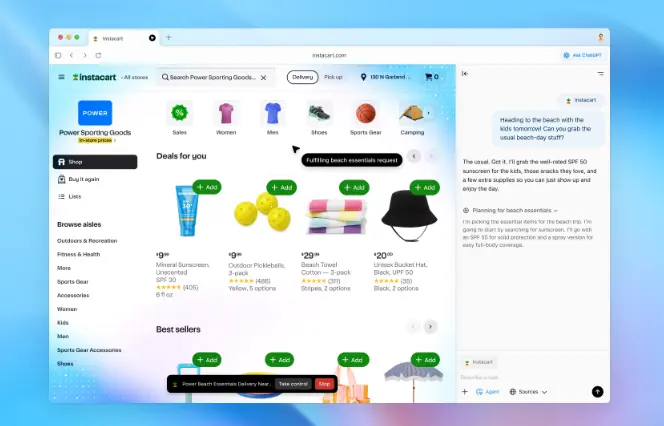
Atlas introduces Agent Mode, a premium feature for Plus and Pro subscribers. In this mode, ChatGPT goes beyond text and executes actions in the browser.
For example, you could say:
- “Find the best hotel in Paris under $250 and book it.”
- “Add this camera to my Amazon cart.”
- “Compare the latest electric vehicles and make a table.”
This shifts the browser from a passive tool into an autonomous assistant capable of completing real-world web tasks — a milestone in AI automation.
Data Import and Cross-Browser Sync
Atlas makes migration easy. You can import bookmarks, saved passwords, and browsing history directly from Chrome, Safari, or Edge.
It can also be set as your default browser, and early adopters receive extended usage benefits such as higher ChatGPT limits and priority model access.
Why ChatGPT Atlas Matters
Traditional search engines are built around keywords, clicks, and links. Atlas replaces this model with intent-based browsing — understanding what users mean rather than what they type.
This has several transformative implications:
- Productivity: Atlas reduces context-switching between tabs and tools.
- Accessibility: Non-technical users can interact with the web more naturally.
- Creativity: Writers, researchers, and developers can brainstorm and fact-check directly within their workflow.
It represents a shift from information retrieval to intelligent assistance — a browser that doesn’t just show content but helps you use it.
Advantages of ChatGPT Atlas
Seamless AI Integration
Unlike AI extensions or plugins, Atlas embeds ChatGPT directly into the browsing core. This ensures faster, more contextually aware interactions and eliminates the friction of managing add-ons or separate apps.
Contextual Understanding
Atlas comprehends your on-screen content in real time. If you’re reading a technical paper, it can explain terminology or summarize key findings. If you’re shopping, it can compare prices or extract product specs.
This contextual understanding redefines convenience — the browser adapts to your current activity rather than making you adapt to its limitations.
Personalized Experience
Through Memory and conversation history, Atlas becomes uniquely tailored to each user. Over time, it feels less like a tool and more like a personalized digital companion that “knows” your habits, style, and interests.
Multi-Task Automation
With Agent Mode, Atlas can handle multi-step workflows such as:
- Conducting research and compiling reports.
- Managing calendar events or reservations.
- Gathering product data across multiple sites.
This represents a huge leap toward web autonomy, where AI agents can interact with websites as humans do — clicking, filling forms, and making decisions based on your goals.
Challenges and Limitations
Despite its innovation, Atlas is not without challenges.
Security Concerns
The integration of a powerful AI model into web browsing introduces potential prompt-injection attacks — malicious web elements that could trick the AI into executing unintended commands. OpenAI has acknowledged this risk and continues refining its sandboxing and permission systems.
Privacy and Data Collection
Because Memory stores personal browsing context, some users worry about data retention and potential exposure. OpenAI states that users can fully control, export, or delete all stored data, but transparency and trust will be key to widespread adoption.
Limited Availability
At launch, Atlas supports only macOS. Windows and mobile releases are expected soon, but for now, accessibility is restricted to Apple users. Additionally, Agent Mode and extended features remain exclusive to paid subscribers.
Search and Link Interaction Limits
Early testers note that while Atlas excels at summaries and context, its direct web navigation — such as viewing multiple search results or advanced filtering — still trails traditional search engines like Google.
The Broader Context: OpenAI vs. Big Tech
With Atlas, OpenAI is positioning itself against giants like Google and Microsoft in a new category — AI-native browsers.
Where Google relies on advertising and algorithmic ranking, OpenAI bets on conversation, personalization, and trust. This could disrupt how we interact with information online, shifting power from search indexes to intelligent agents.
The emergence of AI-first browsers like Atlas may also pressure competitors (Chrome, Edge, Brave, and Opera) to deepen AI integration. We may soon see an ecosystem where every major browser features built-in conversational intelligence.
Implications for Everyday Users
For professionals, students, and casual users alike, ChatGPT Atlas offers clear benefits:
- Writers can instantly summarize articles or generate drafts.
- Researchers can analyze multiple sources without juggling tabs.
- Shoppers can compare products conversationally.
- Businesses can automate repetitive web tasks or customer interactions.
However, users must balance convenience with awareness — understanding what data is stored, how it’s used, and when to manage privacy settings.
Future Outlook
The roadmap for ChatGPT Atlas includes:
- Windows and mobile support within the next update cycle.
- Expanded Agent Mode capabilities, including integration with productivity apps.
- Team and enterprise features, enabling collaborative AI browsing.
- Advanced memory segmentation, allowing different personas or contexts (e.g., “work mode,” “research mode,” “creative mode”).
As AI becomes the front door to the web, Atlas may represent the first true step toward an agent-driven internet, where browsing, working, and learning merge into one fluid experience.
ChatGPT Atlas vs. Traditional Browsers
| Feature | ChatGPT Atlas | Google Chrome | Microsoft Edge |
|---|---|---|---|
| AI Assistant | Built-in ChatGPT | Limited (Gemini extensions) | Copilot sidebar |
| Memory Function | Yes, persistent context | None | None |
| Automation | Agent Mode | Basic scripts | Basic |
| Privacy Control | User-managed memory | Data-driven ads | Microsoft account-based |
| Conversational Search | Native | External | Partial |
| Platform Support | macOS (soon Windows) | All major OS | All major OS |
Atlas clearly leads in conversational interaction and personalization, while traditional browsers still dominate in stability and ecosystem maturity.
Final Thoughts
ChatGPT Atlas represents a bold new direction for the web — where AI doesn’t just assist but collaborates. It blurs the line between browser, assistant, and search engine, creating a unified experience that feels intuitive, intelligent, and deeply personal.
While privacy, reliability, and adoption challenges remain, Atlas signals the start of a new era: the AI-first internet. In time, we may look back on today’s browsers as relics of a pre-conversational web — one that ChatGPT Atlas has already begun to redefine.

FAQs
What is ChatGPT Atlas?
ChatGPT Atlas is an AI browser developed by OpenAI that integrates ChatGPT directly into web navigation. It allows users to explore the internet conversationally, summarize pages, and perform tasks without leaving their browser window.
How is ChatGPT Atlas different from traditional browsers?
Unlike regular browsers, ChatGPT Atlas uses AI to understand context and intent. This AI browser can summarize content, remember preferences, and even act as your personal assistant for intelligent web navigation.
Is ChatGPT Atlas available for Windows and mobile devices?
Currently, ChatGPT Atlas is available for macOS, with Windows, iOS, and Android versions expected soon. OpenAI aims to make this AI browser accessible across all major platforms for seamless, intelligent web navigation.
What are the main features of ChatGPT Atlas?
Key features include conversational search, Agent Mode for automated tasks, personalized memory for context retention, and AI-powered browsing tools that redefine how users interact with the web.
Is ChatGPT Atlas safe for personal data?
OpenAI’s ChatGPT Atlas gives users full control over stored memories and privacy settings. You can view, manage, or delete all saved data, ensuring a transparent and secure AI browser experience.




 and then