









AI Photoshop editing allows photographers to instruct Adobe Photoshop using simple text prompts. Powered by Adobe Firefly, the software analyzes the image, understands the request, and automatically applies complex edits like object removal, lighting adjustments, or background changes within seconds.
KumDi.com
In 2024–2026, a major shift occurred in digital imaging: photographers can now instruct editing software using natural language instead of manual tools. With the latest AI features in Adobe Photoshop, photographers can simply type commands like “brighten the subject,” “remove background distractions,” or “make the sky more dramatic,” and the software performs the edit automatically.
This capability is powered by generative artificial intelligence developed by Adobe, particularly its AI model suite Adobe Firefly. The system interprets text prompts and translates them into complex image-editing actions. As a result, professional photographers and beginners alike can achieve sophisticated edits in seconds—tasks that previously required deep expertise in layers, masks, and adjustment tools.
This article explains how voice- or text-driven Photoshop editing works, the technology behind it, real-world photography workflows, risks, and how professionals are using it today.
Table of Contents

What Does It Mean to “Tell Photoshop How to Edit”?
Traditionally, photo editing required manual interaction with complex tools. A photographer would need to:
- Select an object with a lasso or mask.
- Adjust exposure or color curves.
- Apply filters or transformations.
- Blend layers to achieve the final result.
Now, AI allows users to describe the desired outcome in natural language.
Example Prompt-Based Edits
Photographers can type instructions such as:
- “Remove the people in the background.”
- “Add warm sunset lighting.”
- “Make the sky dramatic with storm clouds.”
- “Blur the background for shallow depth of field.”
- “Extend the frame for a wider landscape.”
Photoshop’s AI system analyzes the image and performs the required operations automatically.
Key takeaway:
Natural language prompts act as high-level instructions, replacing many manual editing steps.
How AI Editing in Photoshop Actually Works
Modern AI-powered editing relies on several technologies working together.
1. Generative Image Models
AI models trained on millions of images learn:
- object shapes
- lighting behavior
- textures
- photographic styles
These models allow the system to synthesize new pixels that blend seamlessly with existing photos.
This technology is central to features like:
- Generative Fill
- Generative Expand
- Smart object replacement
2. Semantic Image Understanding
Before making edits, the software must understand the image content.
AI computer vision models identify:
- people
- sky
- landscapes
- architecture
- foreground vs. background
- lighting direction
For example, if the prompt says:
“Make the sky more dramatic”
the AI automatically identifies the sky region and applies changes only there.
3. Natural Language Processing (NLP)
Prompt-based editing requires interpreting human language.
NLP systems translate commands such as:
“Add cinematic lighting”
into specific editing operations like:
- color grading
- contrast adjustment
- highlight control
- shadow shaping
4. Generative Image Synthesis
When an edit requires creating new elements—such as adding clouds or removing objects—the AI generates photorealistic pixels that match the scene.
This process includes:
- texture synthesis
- perspective matching
- lighting consistency
- noise and grain replication
The result is an edit that often appears indistinguishable from the original photograph.
Key AI Editing Features Photographers Are Using
Generative Fill
Generative Fill allows photographers to add, remove, or modify objects simply by typing instructions.
Example workflow:
- Select an area of the image.
- Enter a prompt like “add wildflowers”.
- The AI generates multiple realistic variations.
Use cases include:
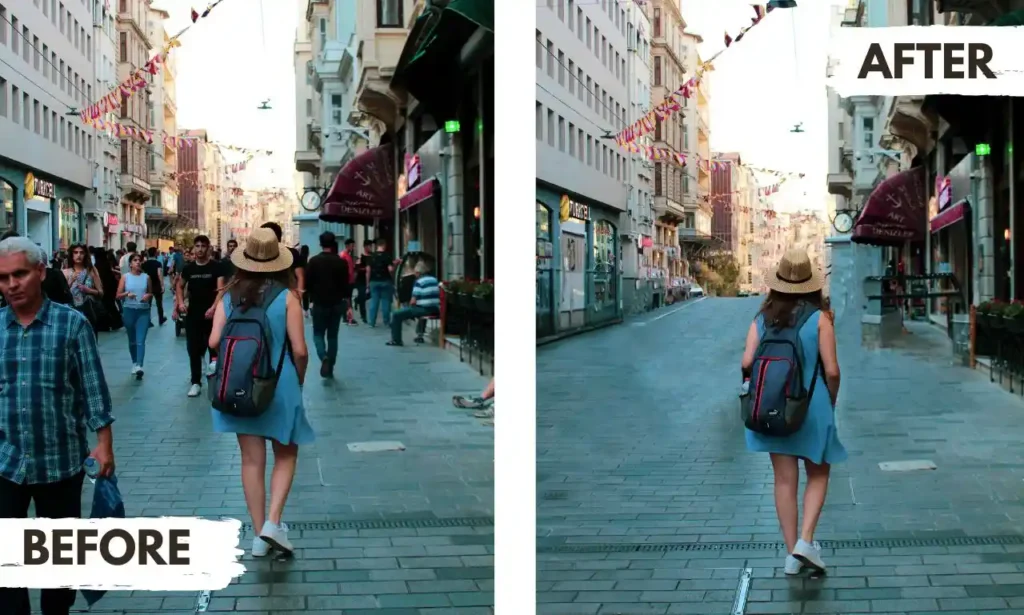
- removing photobombers
- replacing objects
- extending landscapes
- fixing composition mistakes
Generative Expand
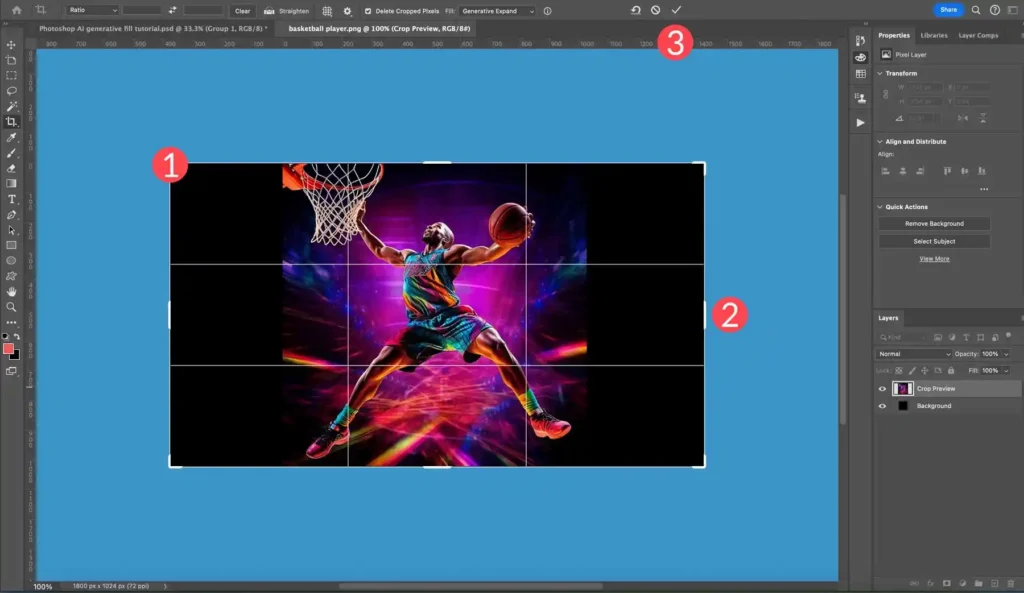
This feature extends an image beyond its original borders.
Photographers can:
- convert vertical photos to horizontal
- widen landscapes
- create space for cropping
The AI generates new image areas that match the existing scene.
AI-Based Background Editing
Background replacement used to require complex masking.
Now photographers can type:
“Replace background with a tropical beach.”
Photoshop automatically:
- isolates the subject
- generates a new environment
- adjusts lighting for realism.
Automatic Lighting Adjustments
AI can simulate professional lighting adjustments.
For example:
“Add warm golden-hour lighting.”
The system modifies:
- color temperature
- shadows
- highlights
- atmosphere
This mimics advanced color grading workflows.
Real-World Use Cases for Photographers
Wedding Photography
Wedding photographers often need to remove distractions quickly.
AI editing can:
- remove unwanted guests from backgrounds
- fix lighting inconsistencies
- enhance sky and scenery
Edits that once took 20–30 minutes per photo can now take seconds.
Landscape Photography
Landscape photographers frequently use AI to:
- enhance skies
- expand compositions
- remove power lines
- add environmental elements like fog or clouds
This allows photographers to recreate the atmosphere they experienced in the field.
Commercial Product Photography
Product photographers benefit from AI tools that can:
- replace backgrounds
- adjust reflections
- extend surfaces
- remove dust or scratches
This reduces the need for expensive reshoots.
Social Media Content Creation
Content creators often need rapid editing for high-volume publishing.
AI-driven editing enables:
- fast batch enhancements
- consistent color grading
- quick background changes
This drastically speeds up production workflows.
Advantages of Prompt-Based Photo Editing
1. Faster Workflow
AI dramatically reduces editing time.
Tasks that previously required advanced Photoshop expertise can now be completed in seconds.
2. Accessibility for Beginners
Prompt-based editing allows beginners to produce professional-quality edits without learning complex tools.
3. Creative Experimentation
Photographers can test ideas rapidly by typing prompts such as:
- “make it cinematic”
- “add fog”
- “change to night scene”
This encourages creative exploration.
4. Reduced Technical Barriers
Professional editing previously required mastering:
- masks
- blend modes
- curves
- frequency separation
AI tools automate many of these technical processes.
Limitations and Risks of AI Photo Editing
Despite its advantages, AI editing also presents important limitations.
Ethical Concerns
AI-generated changes may blur the line between photography and digital illustration.
For example:
- adding objects that never existed
- altering environments
- modifying people’s appearance
This raises ethical concerns in journalism and documentary photography.
Authenticity and Trust
In fields like news photography, heavy AI editing can undermine public trust.
Many media organizations now require:
- disclosure of AI-generated edits
- strict editing guidelines
AI Artifacts
Although AI is improving, it can still produce:
- unrealistic textures
- distorted shapes
- inconsistent lighting
Professional photographers often refine AI results manually.
Best Practices for Professional Photographers
Experts recommend combining AI with traditional editing techniques.
Recommended workflow
- Start with prompt-based AI edits.
- Review generated results carefully.
- Refine details manually if necessary.
- Maintain ethical transparency when publishing.
This approach ensures both efficiency and professional quality.
The Future of AI-Controlled Photo Editing
Experts expect AI-driven editing tools to expand rapidly over the next few years.
Future capabilities may include:
- full voice-controlled editing
- automated style replication
- AI-assisted retouching workflows
- personalized editing models trained on a photographer’s style
Eventually, photographers may interact with editing software more like a creative assistant than a tool.
Conclusion
The ability to tell Photoshop how to edit images using natural language marks a significant milestone in digital photography. AI technologies integrated into Adobe Photoshop—powered by systems like Adobe Firefly—allow photographers to perform complex edits simply by describing their intentions.
This innovation reduces technical barriers, accelerates workflows, and expands creative possibilities. However, professionals must balance these capabilities with ethical responsibility and quality control.
For modern photographers, AI-driven editing is not replacing creativity—it is reshaping how creative ideas are translated into finished images.

FAQs
What is AI Photoshop editing?
AI Photoshop editing allows photographers to edit images using natural language prompts inside Adobe Photoshop. Instead of manually adjusting tools, users can describe the edit, and AI photo editing tools powered by Adobe Firefly automatically modify the image.
How does prompt-based photo editing work in Photoshop?
Prompt-based photo editing works by combining artificial intelligence, computer vision, and generative models. When a photographer types a command, the AI analyzes the image, identifies objects like sky or people, and performs edits such as lighting changes, object removal, or scene expansion.
What is Photoshop Generative Fill?
Photoshop Generative Fill is an AI Photoshop editing feature that allows users to add, remove, or replace objects using text prompts. The system generates realistic image content that blends naturally with the existing photo while maintaining lighting, perspective, and texture.
Can beginners use AI photo editing tools in Photoshop?
Yes. AI photo editing tools make professional editing easier for beginners because they reduce the need for complex manual skills like masking, color grading, and layer blending. Users can simply type instructions and the AI performs the advanced editing tasks automatically.
Is AI Photoshop editing replacing professional photo editing skills?
AI Photoshop editing speeds up workflows but does not replace professional skills. Photographers still refine results, ensure realistic lighting and composition, and maintain ethical editing standards when using AI photo editing tools.


 and then