








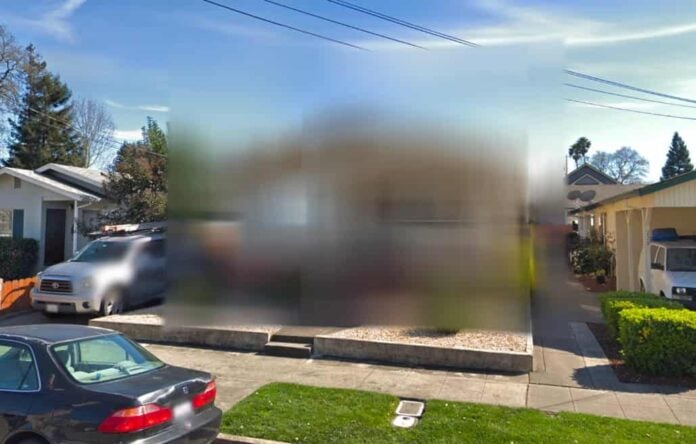

To blur your house on Google Maps, go to Street View, find your home, click “Report a Problem,” and request blurring. Google reviews your submission and removes your home from view once approved.
KumDi.com
If you’re concerned about your personal privacy online, learning how to blur your house on Google Maps is a crucial step. Google’s Street View can reveal sensitive details about your home’s exterior that you may want to keep private. Thankfully, Google allows users to request a blur of their residence directly within the platform. This guide shows you how to protect your privacy in a few simple steps.
In today’s digital age, privacy has become a significant concern for many homeowners. With platforms like Google Maps offering a detailed view of our neighborhoods, including our homes, it’s essential to take proactive steps to safeguard our personal spaces. One effective way to enhance your privacy is by blurring your house on Google Maps. This article will guide you through the process, explain the importance of this action, and provide insights into the broader implications of online visibility.
Table of Contents

Understanding Google Street View
Google Street View is a feature that allows users to virtually explore streets around the globe. Launched in 2007, it has transformed how we navigate and experience our surroundings. However, this service also raises privacy concerns, as it captures images of homes, driveways, and even personal vehicles.
The Technology Behind Street View
Street View operates through a combination of specialized vehicles equipped with high-resolution cameras and advanced imaging technology. These vehicles traverse public roads, capturing panoramic images that are later stitched together to create a seamless view of the environment. While this technology is beneficial for navigation and exploration, it can inadvertently expose sensitive information about homeowners.
Privacy Concerns
The visibility of your home on Google Maps can lead to various risks, including unwanted attention from potential burglars or stalkers. Criminals often use these images to scout properties, looking for vulnerabilities such as unlocked doors or visible valuables. This reality has prompted many individuals, including celebrities, to take action to protect their privacy.
Why You Should Consider Blurring Your Home
Blurring your home on Google Maps is a straightforward yet effective way to enhance your privacy. Here are several reasons why you might want to consider this option:
Deterring Criminal Activity
By obscuring your home from public view, you can reduce the likelihood of becoming a target for burglars. Criminals often use online tools to gather information about potential targets, and a blurred image can serve as a deterrent.
Protecting Personal Information
In addition to safeguarding your property, blurring your home helps protect your personal information. With detailed images available online, it’s easier for individuals with malicious intent to gather information about your lifestyle, habits, and security measures.
Maintaining Control Over Your Image
Blurring your home allows you to maintain control over how your property is represented online. Once you submit a request to Google, the blur is permanent, ensuring that your home remains obscured from public view.
How to Blur Your House on Google Maps

The process of blurring your house on Google Maps is simple and can be completed in just a few steps. Here’s a detailed guide to help you through the process:
Step 1: Access Google Maps
Begin by navigating to Google Maps on your computer or mobile device. While the mobile app offers limited functionality, using a web browser on your desktop or laptop is recommended for a smoother experience.
Step 2: Locate Your Home
In the search bar, enter your home address and press enter. Once the map zooms in on your location, drag the small yellow human-shaped icon (known as the Pegman) onto the map to enter Street View mode.
Step 3: Report a Problem
With your home in view, look for the “Report a Problem” link located in the bottom-right corner of the screen. Click on this link to initiate the blurring request.
Step 4: Adjust the View
A red box will appear on the screen. Adjust this box to encompass your home and any other elements you wish to blur. You can use the zoom in and out buttons to ensure that the area you want to obscure is correctly framed.
Step 5: Specify What to Blur
You will be prompted to select what you want to blur. Options typically include your home, a vehicle, or a face. Make sure to choose the appropriate option to ensure your request is processed correctly.
Step 6: Provide Additional Information
In the provided field, briefly explain why you want the image blurred. This could be due to safety concerns, privacy issues, or simply a desire to keep your home out of the public eye.
Step 7: Submit Your Request
Finally, enter your email address and complete any CAPTCHA verification if prompted. Click “Submit” to send your request to Google. You will receive a confirmation email indicating that your report is under review.
What Happens After You Submit Your Request?
Once your request is submitted, Google will review the image and your request. Here’s what to expect during this process:
Review Process
Google typically reviews requests promptly, but the exact timeframe can vary. If additional information is needed, you may receive an email asking for clarification regarding your request.
Permanent Changes
It’s important to note that once your home is blurred, this change is permanent. Google emphasizes that the blurring cannot be undone, so ensure that you are confident in your decision before submitting the request.
Notification of Outcome
After the review is complete, you will receive an email informing you whether your request has been approved or denied. If approved, your home will be blurred on Google Maps, enhancing your privacy.
Additional Privacy Measures
While blurring your home on Google Maps is a significant step towards protecting your privacy, there are additional measures you can take to further safeguard your personal space.
Install Security Systems
Consider investing in a comprehensive security system that includes cameras, alarms, and motion detectors. These systems can deter potential intruders and provide peace of mind.
Use Privacy Settings on Social Media
Be mindful of the information you share on social media platforms. Adjust your privacy settings to limit who can see your posts and personal information.
Educate Your Family
Ensure that everyone in your household understands the importance of privacy and security. Discuss the potential risks associated with sharing personal information online and encourage safe practices.
The Broader Implications of Online Visibility
The ability to view homes and neighborhoods online has broader implications beyond individual privacy concerns. Here are some key points to consider:
The Impact on Neighborhood Safety
As more people become aware of the risks associated with online visibility, communities may experience a shift in how residents approach security. Increased awareness can lead to stronger neighborhood watch programs and community engagement.
The Role of Technology in Privacy
The advancement of technology has made it easier for individuals to access information about others. This reality underscores the importance of understanding how to navigate these tools responsibly and protect personal privacy.
Legal Considerations
As privacy concerns continue to grow, legal frameworks surrounding online visibility may evolve. Homeowners should stay informed about their rights and any changes in legislation that may impact their privacy.
Conclusion
In an era where digital visibility is ubiquitous, taking steps to protect your privacy is more important than ever. Blurring your house on Google Maps is a simple yet effective way to enhance your security and maintain control over your personal space. By following the outlined steps and considering additional privacy measures, you can safeguard your home from unwanted attention and ensure that your personal information remains protected.
Taking action today can help you enjoy peace of mind in an increasingly connected world.

FAQs
How do I blur my house on Google Maps for privacy?
To blur your house on Google Maps, open Street View, locate your home, click “Report a Problem,” and submit a request to hide it. This improves Google Maps privacy settings for your location.
Can I hide my house permanently from Google Street View?
Yes, once your Google Street View removal request is approved, the blur is permanent and cannot be reversed, ensuring long-term privacy protection.
How long does it take for Google to blur a house?
After submitting the request to blur your house on Google Maps, it usually takes a few days to a couple of weeks for Google to review and apply the change.
Will blurring my house affect Google Maps navigation or directions?
No, blurring your house affects only the visual Street View imagery. Navigation, maps, and directions will remain fully functional.
Can I blur other personal information besides my house on Google Maps?
Yes, you can request to blur faces, vehicles, license plates, or any other identifiable objects in Google Maps Street View to enhance your online privacy.




 and then