








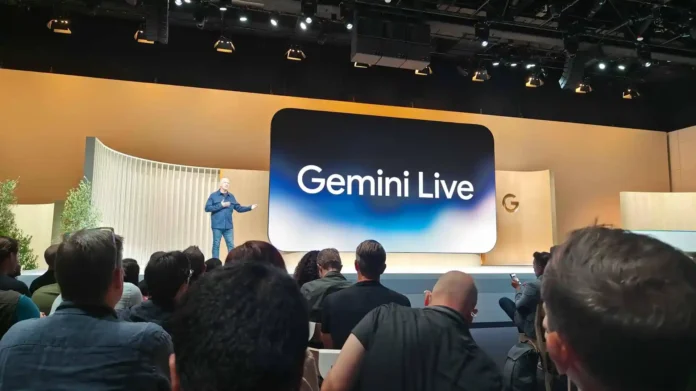

What is Google Gemini Live voice chat?
KumDi.com
Google Gemini Live voice chat is Google’s conversational AI experience that allows users to interact naturally using spoken language. Beginning in summer 2026, Gemini Live expands to Gmail, Google Docs, and Google Keep, enabling users to draft documents, search emails, organize notes, and collaborate with AI through continuous voice conversations. The rollout starts in the U.S. in English for Google AI Pro and Google AI Ultra subscribers.
Google is significantly expanding Gemini Live, its real-time conversational AI experience, beginning in summer 2026. Rather than functioning as a simple voice assistant, Gemini Live is evolving into a natural, multimodal AI companion capable of understanding speech, context, documents, images, and connected Google services during an ongoing conversation.
The summer 2026 rollout introduces voice-first experiences across Google Docs, Gmail, Google Keep, and the Gemini app itself. Users can brainstorm, write documents, search emails, organize notes, and continue conversations without repeatedly pressing buttons or typing prompts. The initial rollout begins in the United States in English for eligible subscribers, with broader availability expected afterward.
Table of Contents

What Is Google Gemini Live?
Google Gemini Live is Google’s conversational AI interface that allows users to interact with Gemini using continuous natural speech instead of traditional text prompts.
Unlike conventional voice assistants that execute isolated commands, Gemini Live supports:
- Continuous back-and-fort
- Context-aware conversations
- Natural interruptions
- Multi-turn reasoning
- Real-time collaboration
- Multimodal understanding
The system remembers the ongoing conversation, allowing users to change topics naturally without restarting each request.
What Is New in Summer 2026?
Google’s summer 2026 update transforms Gemini Live from a mobile voice chatbot into a productivity platform integrated across Google’s ecosystem.
Major additions include:
1. Docs Live
Users can speak naturally while Gemini creates documents in real time.
Examples include:
- brainstorming ideas
- outlining reports
- drafting articles
- rewriting paragraphs
- changing writing tone
- expanding sections
Instead of typing every sentence, users simply explain what they want, and Gemini builds the document interactively.
2. Gmail Live
Gemini can answer spoken questions using information stored in Gmail.
Example questions include:
- “What time is my flight?”
- “Did my manager send today’s meeting notes?”
- “When is my payment due?”
- “Find the latest invoice.”
Rather than searching manually, Gemini summarizes relevant emails and answers conversationally.
3. Google Keep Live
Voice notes become structured information automatically.
Gemini can:
- separate multiple ideas
- generate task lists
- organize shopping lists
- create reminders
- categorize notes
This reduces the need for manual editing after recording ideas.
4. Improved Gemini App Experience
Google has redesigned the Gemini interface using its Neural Expressive design language.
Users can now:
- switch between typing and voice instantly
- continue conversations while viewing generated content
- export responses directly into Google Workspace
- keep conversations flowing naturally
The experience feels closer to talking with an AI collaborator than issuing commands to a digital assistant.
How Gemini Live Voice Chat Works
Gemini Live combines several AI technologies simultaneously:
| Component | Purpose |
|---|---|
| Speech Recognition | Converts spoken language into text |
| Large Language Model | Understands context and intent |
| Reasoning Engine | Plans responses and tasks |
| Voice Synthesis | Produces natural spoken replies |
| Connected Apps | Retrieves information from Google services |
| Multimodal AI | Understands images, documents, and screens |
Unlike earlier assistants that interpreted one command at a time, Gemini Live maintains conversational context throughout an interaction.
Supported Google Services
Summer 2026 expands Gemini Live across numerous Google products.
Current integrations include:
- Gmail
- Google Docs
- Google Keep
- Google Calendar
- Google Maps
- Google Tasks
- Google Workspace
- YouTube
- YouTube Music
- Google Home
- Shopping
- Hotels
- Flights
Google has also expanded support for several third-party connected apps on Android.
Practical Real-World Use Cases
Writing Reports
Instead of typing:
“Create a marketing report.”
A user can simply explain:
“Summarize our campaign results, mention increased traffic, compare last quarter, and finish with recommendations.”
Gemini organizes the information into a polished draft.
Managing Email
Busy professionals often receive hundreds of emails weekly.
Rather than searching manually:
“Did the client approve the proposal?”
Gemini searches Gmail, identifies the relevant conversation, and provides a concise spoken summary.
Meeting Preparation
Before joining a meeting, users can ask:
- “Summarize yesterday’s emails.”
- “Find today’s agenda.”
- “Open my project notes.”
Gemini gathers information from multiple Google services without switching apps.
Brainstorming
Students, researchers, and creators can simply think aloud.
Gemini can:
- organize scattered ideas
- build outlines
- suggest improvements
- create structured plans
This conversational workflow reduces friction during creative work.
Availability
Google announced that the new voice experiences begin rolling out during summer 2026.
Initial availability includes:
- United States
- English language
- Android
- iOS
- Google AI Pro subscribers
- Google AI Ultra subscribers
Google Workspace business customers receive access through preview programs before wider enterprise deployment.
Privacy Considerations
Because Gemini Live accesses connected applications, privacy controls remain important.
Users must grant permission before Gemini can access:
- Gmail
- Google Drive
- Calendar
- Docs
- Keep
- Chat
Google states that connected app access occurs only with user authorization, allowing individuals to control which services Gemini can reference during conversations.
Gemini Live vs Traditional Voice Assistants
| Feature | Traditional Voice Assistant | Gemini Live |
|---|---|---|
| Multi-turn conversations | Limited | Yes |
| Context memory | Minimal | Extensive |
| Document creation | Basic | Advanced |
| Email understanding | Limited | Context-aware |
| Brainstorming | Poor | Excellent |
| Natural interruptions | Limited | Supported |
| Workspace integration | Basic | Deep integration |
Benefits for Different Users
Students
- Create essays
- Organize research
- Summarize notes
- Prepare presentations
Professionals
- Draft documents
- Search emails
- Prepare meetings
- Generate reports
Content Creators
- Brainstorm ideas
- Write scripts
- Outline videos
- Edit drafts
Small Businesses
- Prepare customer emails
- Organize tasks
- Draft proposals
- Improve productivity
Potential Limitations
Although Gemini Live is becoming more capable, users should understand its current boundaries.
Potential limitations include:
- Initial rollout restricted to selected regions and languages.
- Some advanced features require paid Google AI subscriptions.
- Connected app functionality depends on user permissions.
- AI-generated content should still be reviewed before publication or business use.
As with any generative AI system, human oversight remains essential for factual accuracy and compliance.
FAQs
When does Google Gemini Live voice chat launch?
Google announced that the expanded Gemini Live voice features will begin rolling out in summer 2026 for eligible users in the United States, with broader availability expected later.
What can Gemini Live do?
Gemini Live lets users have natural voice conversations with AI, create and edit documents, search Gmail, organize notes in Google Keep, brainstorm ideas, and interact with connected Google services without relying on typed prompts.
Is Google Gemini Live free?
Some Gemini features are available at no cost, but the new productivity-focused voice experiences introduced in summer 2026 initially require a Google AI Pro or Google AI Ultra subscription.
Which apps work with Gemini Live?
Gemini Live integrates with Google Docs, Gmail, Google Keep, Google Calendar, Google Drive, Google Maps, Google Tasks, YouTube, and other supported Google Workspace services, with additional connected apps continuing to expand.
Is Gemini Live available on Android and iPhone?
Yes. Google is rolling out the new Gemini Live voice experience for both Android and iOS devices through the Gemini app, beginning with supported regions and eligible subscription plans.
Final Thoughts
The summer 2026 expansion of Google Gemini Live marks a notable shift from traditional voice assistants toward AI-powered conversational productivity. By integrating deeply with Gmail, Google Docs, Google Keep, and other Workspace services, Gemini Live enables users to speak naturally while drafting documents, retrieving information, organizing notes, and managing daily tasks.
Rather than replacing typing entirely, Gemini Live complements existing workflows with continuous, context-aware voice interaction. For professionals, students, creators, and businesses already using Google’s ecosystem, it represents one of the most significant advancements in hands-free AI assistance announced at Google I/O 2026.




 and then