







What is new in ChatGPT Images 2.5?
KumDi.com
ChatGPT Images 2.5 improves image quality, editing precision, reference-image consistency, and generation speed. OpenAI also introduces Sketch-to-image, creative templates, image comments, prompt sharing, and new GPT-Image-2.5 API models for developers.
OpenAI has released ChatGPT Images 2.5, a major update to its image-generation system that focuses on sharper visual detail, more precise editing, stronger consistency across multiple edits, and faster image generation. Released on September 8, 2026, Images 2.5 is available across ChatGPT on desktop, mobile, and web, while developers can access related GPT-Image-2.5 models through the API.
The most important change is not simply that Images 2.5 can create attractive pictures. The model is designed to make iterative image creation more reliable: users can start with a reference photo or rough sketch, make targeted changes, and continue refining the result while preserving more of the original subject, composition, and visual details. OpenAI also reports up to 50% lower image-generation latency compared with Images 2.0.
Table of Contents

What Is ChatGPT Images 2.5?
ChatGPT Images 2.5 is OpenAI’s latest image-generation model and creative-image experience for ChatGPT. It can generate new images from text instructions, transform reference images, perform targeted edits, and maintain visual characteristics through multiple rounds of changes.
Unlike a workflow where every new request effectively starts over, Images 2.5 is designed around controlled visual iteration. That distinction matters for practical users.
For example, imagine creating a product photograph for an online store. A user might initially generate a product on a studio background, then request:
- Change the background to a modern kitchen.
- Keep the product unchanged.
- Adjust the lighting.
- Replace only the headline.
- Add a second product beside it.
- Change the image to a promotional layout.
The usefulness of an image model in this situation depends not only on the quality of the first image but also on how reliably it preserves important elements during subsequent edits. OpenAI says Images 2.5 has been improved specifically for this type of multi-turn workflow.
What’s New in ChatGPT Images 2.5?
OpenAI highlights several major improvements in the new model.
1. Sharper Details and More Natural Visuals
Images 2.5 is designed to produce more natural lighting, richer textures, and greater visual fidelity.
This is particularly relevant when generating images based on real-world reference material. According to OpenAI, the model is better at preserving recognizable characteristics from reference photos, including distinctive subject features, while adapting the subject to a new setting, composition, or visual style.
This can be useful for:
- Portrait transformations
- Product photography
- Brand imagery
- Editorial illustrations
- Social media graphics
- Marketing campaigns
- Character concepts
- Lifestyle imagery
- Photo-based creative projects
The practical advantage is fidelity. If a user provides a reference image, the objective is no longer simply to create something aesthetically similar. The goal is to preserve the identity and important visual attributes of the source while changing the requested elements.
2. More Precise Image Editing
One of the most significant improvements is targeted editing.
Earlier generations of image models could sometimes modify more of an image than the user intended. For example, asking an AI system to change a person’s clothing might unintentionally alter the person’s face, lighting, background, pose, or surrounding objects.
Images 2.5 is designed to better distinguish between:
What should change
and
What should remain unchanged.
OpenAI specifically describes improved ability to edit only the requested element while preserving the surrounding composition, subject, and background.
Example
Suppose a designer has generated a product advertisement and wants to change only the product’s color.
A less controlled workflow might regenerate large portions of the image.
With improved precision, the intended workflow is closer to:
Change the product from black to silver. Keep the camera angle, background, lighting, shadows, logo, typography, and composition unchanged.
This distinction is extremely important for professional creative work because unnecessary changes create additional review cycles.
3. Better Consistency Across Multiple Edits
Another major improvement is multi-turn editing consistency.
AI image generation has traditionally had a frustrating problem: an image may look correct initially, but repeated modifications can gradually introduce unwanted changes.
A person’s appearance may drift.
A product may change shape.
Background details may disappear.
Typography may change.
Lighting may become inconsistent.
OpenAI says Images 2.5 is better at maintaining earlier edits as the conversation continues, allowing each subsequent modification to build on the previous result.
This makes the model particularly relevant to workflows that require several rounds of creative direction.
A practical workflow
A designer might begin with:
Step 1: Create a lifestyle product image.
Step 2: Change the setting from an office to a hotel room.
Step 3: Preserve the product while changing the lighting.
Step 4: Add a person in the background.
Step 5: Convert the composition into a promotional advertisement.
Step 6: Correct a specific piece of text.
The ability to make these changes without repeatedly rebuilding the entire image can significantly reduce creative iteration time.
4. Up to 50% Faster Generation
Speed is another important part of the Images 2.5 update.
OpenAI says image-generation latency has been reduced by up to 50% compared with Images 2.0.
This matters because image generation is inherently iterative.
The real workflow is rarely:
Prompt → perfect image.
More commonly it is:
Prompt → image → evaluate → edit → evaluate → edit → final image.
Reducing the time required for each iteration can therefore have a larger practical impact than simply reducing the time needed to generate the first image.
For marketers, designers, creators, and developers generating multiple variations, faster feedback can translate into more efficient experimentation.
5. New Sketch-to-Image Feature
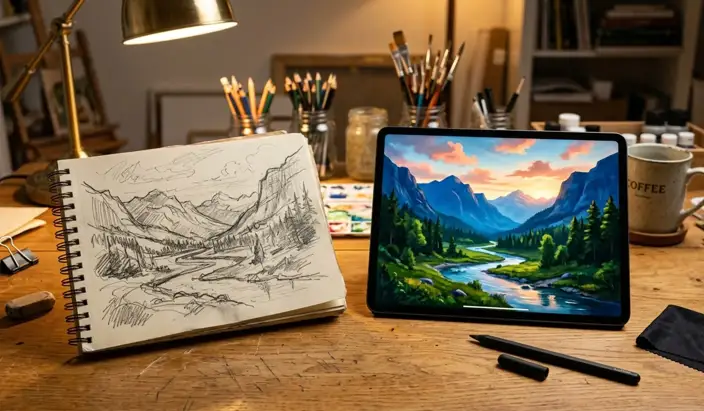
One of the most interesting additions is Sketch.
Instead of describing every spatial relationship with words, users can draw a rough visual reference directly in ChatGPT and ask the system to turn it into a finished image.
OpenAI describes use cases such as sketching:
- A room layout
- Clothing concepts
- Visual compositions
- Object placement
- Rough creative ideas
- Simple doodles
Users can then add a textual description specifying the desired style and other details. In ChatGPT, the feature can be accessed by typing @Sketch.
Why Sketch matters
Text is not always the best way to communicate spatial intent.
Consider a user who wants:
- A person standing on the left
- A product in the center
- A table in the foreground
- A window in the upper-right corner
- A specific camera angle
Describing those relationships can become cumbersome.
A simple sketch can communicate the intended composition much more efficiently.
This creates a hybrid workflow:
Human: supplies rough spatial thinking
AI: supplies visual execution
That is potentially more useful than relying exclusively on increasingly elaborate prompts.
6. Templates Make Image Creation Easier
Images 2.5 also introduces templates for common creative formats.
Rather than starting from an entirely blank prompt, users can select a template and then provide the relevant information and visual direction.
OpenAI specifically mentions formats such as posters and merchandise.
Templates can help users who know what they want to communicate but do not necessarily know how to structure an image-generation prompt.
For example, instead of asking:
Create a professional promotional graphic…
a template-based workflow can establish the general format first, allowing the user to concentrate on:
- The message
- Product information
- Visual style
- Supporting imagery
- Brand elements
- Layout preferences
This is an important usability improvement because successful image generation is not only about model capability; it is also about how easily users can express their intent.
7. Image Comments for More Focused Editing
Images 2.5 also introduces the ability to add comments directly to images for more focused editing.
This provides another way to communicate the exact part of an image that needs attention.
Instead of describing an entire image again, the user can indicate the relevant area and explain the desired change.
That can make the editing process more natural, particularly when working with complicated compositions.
For example:
Change the text in this area but keep the illustration unchanged.
or:
Remove this object while preserving the background texture.
The underlying goal is the same as precision editing: reduce unintended changes.
8. Share Prompts Along With Images
OpenAI has also added a way to share the prompt used to create an image.
This changes image sharing from simply:
“Here is the result.”
to:
“Here is the result and the creative instruction behind it.”
Another user can then use the same concept while substituting their own photo, subject, or details.
For creators and educators, this can make prompts easier to reproduce and adapt.
It also makes AI-generated images more useful as demonstrations because the creative process can be shared alongside the output.
ChatGPT Images 2.5 vs. Images 2.0
The key differences can be summarized as follows:
| Area | Images 2.0 | Images 2.5 |
|---|---|---|
| Image quality | High-quality generation | Sharper details and richer textures |
| Reference fidelity | Strong | Improved preservation of recognizable subjects |
| Editing | Capable | More precise targeted edits |
| Multi-turn consistency | Improved over earlier systems | Further improved |
| Generation speed | Baseline | Up to 50% lower latency, according to OpenAI |
| Sketch workflow | — | New Sketch feature |
| Templates | Limited | New templates for common formats |
| Image comments | — | New focused editing workflow |
| Prompt sharing | — | Available for shared image workflows |
| API models | GPT-Image-2 | GPT-Image-2.5 Flare and Sunburst |
The important point is that Images 2.5 is not positioned merely as a quality upgrade. The update combines model capability with workflow improvements.
What Are GPT-Image-2.5 Flare and Sunburst?
For developers, OpenAI is introducing two API models associated with Images 2.5.
GPT-Image-2.5 Flare
Flare is positioned as the general-purpose option.
OpenAI says it provides the quality, editing, and speed improvements of Images 2.5 and is intended for applications including:
- Creator tools
- Social content
- Product experiences
- Visual search
- Rapid prototyping
- High-volume image generation
OpenAI describes Flare as delivering higher-quality images than GPT-Image-2 while offering approximately 50% lower latency.
GPT-Image-2.5 Sunburst
Sunburst is aimed at workflows where more detailed creative control is important.
It is intended for premium visual applications such as:
- Production campaign creative
- Polished product imagery
- Detailed editing workflows
- High-control creative production
The trade-off is longer generation time in exchange for greater precision.
This creates a useful distinction between high-volume generation and higher-control production work.
Why These Improvements Matter for Businesses
The significance of Images 2.5 becomes clearer when considering how businesses actually produce visual content.
A marketing team rarely needs one image.
It may need:
- Several campaign concepts
- Multiple product variations
- Different aspect ratios
- Localized promotional graphics
- Social media versions
- Website banners
- Product backgrounds
- Seasonal campaigns
The bottleneck is therefore not simply image generation. It is iteration and consistency.
A model that can preserve a product while changing its environment, maintain a visual identity across revisions, and respond to targeted instructions can reduce the number of manual corrections required.
For ecommerce, for example, a company could start from a source product image and create different environments while preserving the product itself.
For content teams, the same visual concept could be adapted into multiple campaign formats.
For designers, AI can function as a rapid ideation and editing layer rather than merely an automatic image generator.
How to Get Better Results With ChatGPT Images 2.5
Even with a more capable model, prompt quality still matters.
A practical structure is:
1. Define the subject
Explain exactly what should appear.
2. Define the composition
Specify positioning, framing, camera perspective, or hierarchy.
3. Define the visual style
Describe whether the result should be photographic, editorial, illustrative, cinematic, minimalist, retro, or another clearly defined style.
4. Define what must remain unchanged
This is especially important when editing an existing image.
For example:
Keep the person’s face, hairstyle, pose, clothing, lighting, and camera angle unchanged.
5. Define the specific modification
Then identify exactly what should change.
For example:
Replace only the background with a modern Seoul café.
6. Refine iteratively
Instead of rewriting the entire prompt every time, make targeted follow-up requests.
This aligns particularly well with Images 2.5’s improved multi-turn consistency.
Are ChatGPT Images 2.5 Outputs Perfect?
No.
The improvements do not eliminate all limitations of generative image systems.
OpenAI’s own documentation emphasizes that image generation remains an evolving technology, and its safety documentation identifies areas requiring continued evaluation.
Users should therefore review important outputs rather than assuming that every generated image is factually or visually correct.
This is especially important for:
- Scientific illustrations
- Medical diagrams
- Technical instructions
- Maps
- Product specifications
- Legal or regulatory information
- Financial information
- Educational materials containing factual claims
A visually convincing image can still contain an incorrect detail.
For professional applications, human review remains an important quality-control step.
What About AI Image Safety and Provenance?
OpenAI says ChatGPT Images 2.5 continues to use safeguards designed to prevent harmful image-generation requests.
OpenAI also states that it uses C2PA metadata and invisible watermarking to help identify images created with its tools.
Its published system card also describes safety evaluations, live blocking, conversation review, and image-provenance measures.
These measures are important because increasingly realistic AI-generated imagery makes provenance and responsible use more significant.
However, provenance technology should not be treated as a substitute for human judgment. Organizations using AI-generated images should still consider consent, copyright, trademarks, privacy, disclosure requirements, and the context in which an image will be published.
Who Should Use ChatGPT Images 2.5?
Images 2.5 is particularly relevant to people who need to create and revise images repeatedly, rather than simply generate a single illustration.
It can be useful for:
- Content creators — rapid visual concepts and social media assets
- Marketers — campaign variations and promotional graphics
- Ecommerce teams — product scenes and variations
- Designers — visual exploration and iterative editing
- Small businesses — marketing imagery without a large production workflow
- Developers — integrating image generation into applications
- Educators — diagrams, illustrations, and teaching materials
- Creative professionals — reference-driven image development
The strongest use case is arguably the workflow in which the human remains the creative director while AI handles much of the visual execution and iteration.
FAQs
What is ChatGPT Images 2.5?
ChatGPT Images 2.5 is OpenAI’s latest image-generation and editing model, designed to create more detailed images and provide more precise, consistent edits.
What is better about ChatGPT Images 2.5?
The major improvements include sharper visual details, better preservation of reference images, more accurate targeted editing, stronger consistency across multiple edits, and faster image generation.
Is ChatGPT Images 2.5 faster than Images 2.0?
Yes. OpenAI says Images 2.5 can provide up to 50% lower image-generation latency compared with Images 2.0.
Can ChatGPT Images 2.5 edit existing images?
Yes. It can make targeted changes to existing images while attempting to preserve important elements such as the subject, composition, background, and other details that were not requested for modification.
What are GPT-Image-2.5 Flare and Sunburst?
They are API models associated with the Images 2.5 generation. Flare is designed as a general-purpose, faster option, while Sunburst focuses more on higher-control, detailed creative production workflows.
The Bottom Line: Is ChatGPT Images 2.5 a Major Upgrade?
Yes. ChatGPT Images 2.5 is a meaningful upgrade because it improves not only image quality but also the process of creating and refining images.
The biggest advances are:
- Sharper details and more natural lighting and textures
- Better preservation of reference subjects
- More precise targeted editing
- Stronger consistency across multiple editing turns
- Up to 50% lower generation latency compared with Images 2.0
- New Sketch-to-image functionality
- Templates for common creative formats
- Image comments for focused revisions
- Prompt sharing
- New GPT-Image-2.5 models for developers
The broader significance is that AI image generation is moving beyond the simple “write a prompt and generate a picture” model.
The more useful paradigm is becoming:
Reference → sketch → generate → edit → refine → preserve → share.
That workflow is much closer to how professional visual production actually works.
For everyday ChatGPT users, Images 2.5 makes image creation faster and easier to control. For businesses and developers, the improvements in fidelity, editing consistency, and API-based generation could make AI-generated imagery more practical for repeatable production workflows.
OpenAI says ChatGPT Images 2.5 is rolling out to ChatGPT, ChatGPT Work, and Codex users across desktop, mobile, and web, while GPT-Image-2.5 Flare and Sunburst are available through the API.




 and then